Middleware là một hàm được gọi trước hàm xử lý route (route handler). Hàm middleware có quyền truy cập vào object request và response, cùng với hàm middleware next() trong chu trình request-response của ứng dụng. Hàm middleware tiếp theo thường được đặt tên bằng biến next.
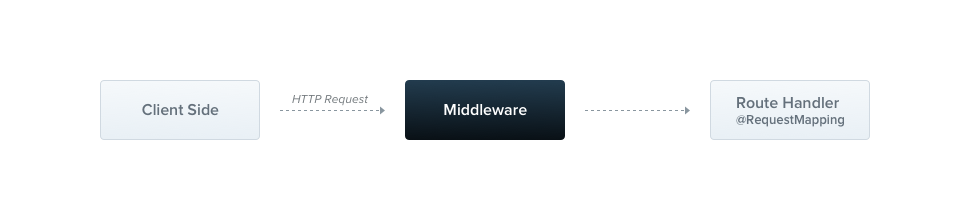
Middleware của Nest, theo mặc định, tương đương với middleware của express. Mô tả sau từ tài liệu chính thức của express mô tả các khả năng của middleware:
Middleware functions can perform the following tasks:
- execute any code.
- make changes to the request and the response objects.
- end the request-response cycle.
- call the next middleware function in the stack.
- if the current middleware function does not end the request-response cycle, it must call
next()to pass control to the next middleware function. Otherwise, the request will be left hanging.
Bạn triển khai middleware tùy chỉnh của Nest ở dạng một hàm, hoặc một class có decorator @Injectable(). Class phải implement interface NestMiddleware, còn hàm thì không có yêu cầu đặc biệt nào. Hãy bắt đầu bằng việc triển khai một middleware đơn giản dùng cách class.
Ghi chú người dịch Đúng như tên gọi, đây gần như là middleware Express nguyên bản ((req, res, next) => {}), chỉ khác là Nest cho bạn gói nó vào một class để có thể inject dependency qua constructor. Nếu bạn đã quen viết middleware Express hay middleware Go (func(next http.Handler) http.Handler), chữ ký use(req, res, next) sẽ trông rất quen.
Cảnh báo Express và fastify xử lý middleware khác nhau và cung cấp các method signature khác nhau, đọc thêm tại đây.
import { Injectable, NestMiddleware } from '@nestjs/common';
import { Request, Response, NextFunction } from 'express';

@Injectable()
export class LoggerMiddleware implements NestMiddleware {
  use(req: Request, res: Response, next: NextFunction) {
    console.log('Request...');
    next();
  }
}
import { Injectable } from '@nestjs/common';
@Injectable()
export class LoggerMiddleware {
use(req, res, next) {
console.log('Request...');
next();
}
}
Tiêm phụ thuộc (Dependency injection)
Middleware của Nest hỗ trợ đầy đủ Dependency Injection. Cũng giống như provider và controller, chúng có thể inject dependency khả dụng trong cùng một module. Như thường lệ, việc này được thực hiện thông qua constructor.
Áp dụng middleware (Applying middleware)
Không có chỗ cho middleware trong decorator @Module(). Thay vào đó, chúng ta thiết lập chúng bằng method configure() của module class. Các module có sử dụng middleware phải implement interface NestModule. Hãy thiết lập LoggerMiddleware ở cấp AppModule.
import { Module, NestModule, MiddlewareConsumer } from '@nestjs/common';
import { LoggerMiddleware } from './common/middleware/logger.middleware.js';
import { CatsModule } from './cats/cats.module.js';

@Module({
  imports: [CatsModule],
})
export class AppModule implements NestModule {
  configure(consumer: MiddlewareConsumer) {
    consumer
      .apply(LoggerMiddleware)
      .forRoutes('cats');
  }
}
import { Module } from '@nestjs/common';
import { LoggerMiddleware } from './common/middleware/logger.middleware.js';
import { CatsModule } from './cats/cats.module.js';
@Module({
imports: [CatsModule],
})
export class AppModule {
configure(consumer) {
consumer
.apply(LoggerMiddleware)
.forRoutes('cats');
}
}Trong ví dụ trên, chúng ta đã thiết lập LoggerMiddleware cho các route handler của /cats đã được định nghĩa trước đó bên trong CatsController. Chúng ta cũng có thể giới hạn thêm một middleware cho một request method cụ thể bằng cách truyền một object chứa path của route và method của request vào method forRoutes() khi cấu hình middleware. Trong ví dụ dưới đây, chú ý rằng chúng ta import enum RequestMethod để tham chiếu đến loại request method mong muốn.
import { Module, NestModule, RequestMethod, MiddlewareConsumer } from '@nestjs/common';
import { LoggerMiddleware } from './common/middleware/logger.middleware.js';
import { CatsModule } from './cats/cats.module.js';

@Module({
  imports: [CatsModule],
})
export class AppModule implements NestModule {
  configure(consumer: MiddlewareConsumer) {
    consumer
      .apply(LoggerMiddleware)
      .forRoutes({ path: 'cats', method: RequestMethod.GET });
  }
}
import { Module, RequestMethod } from '@nestjs/common';
import { LoggerMiddleware } from './common/middleware/logger.middleware.js';
import { CatsModule } from './cats/cats.module.js';
@Module({
imports: [CatsModule],
})
export class AppModule {
configure(consumer) {
consumer
.apply(LoggerMiddleware)
.forRoutes({ path: 'cats', method: RequestMethod.GET });
}
}Gợi ý Method configure() có thể được biến thành bất đồng bộ bằng async/await (ví dụ, bạn có thể await một thao tác bất đồng bộ hoàn tất bên trong thân của method configure()).
Cảnh báo Khi dùng adapter express, ứng dụng NestJS sẽ đăng ký json và urlencoded từ package body-parser theo mặc định. Điều này có nghĩa là nếu bạn muốn tùy chỉnh middleware đó qua MiddlewareConsumer, bạn cần tắt middleware global đó bằng cách đặt flag bodyParser thành false khi tạo ứng dụng với NestFactory.create().
Route wildcards
NestJS middleware cũng hỗ trợ route dựa trên pattern. Ví dụ, wildcard có tên (*splat) có thể được dùng như một wildcard để khớp bất kỳ tổ hợp ký tự nào trong một route. Trong ví dụ sau, middleware sẽ được thực thi cho bất kỳ route nào bắt đầu bằng abcd/, bất kể có bao nhiêu ký tự theo sau.
forRoutes({
  path: 'abcd/*splat',
  method: RequestMethod.ALL,
});
Gợi ý splat chỉ đơn giản là tên của tham số wildcard và không có ý nghĩa đặc biệt nào. Bạn có thể đặt tên nó tùy ý, ví dụ *wildcard.
Route path 'abcd/*splat' sẽ khớp với abcd/1, abcd/123, abcd/abc, v.v. Dấu gạch ngang (-) và dấu chấm (.) được diễn giải theo nghĩa đen (literally) bởi các path dạng chuỗi. Tuy nhiên, abcd/ không có thêm ký tự nào sẽ không khớp với route này. Để làm được điều đó, bạn cần bọc wildcard trong dấu ngoặc nhọn để biến nó thành tùy chọn:
forRoutes({
  path: 'abcd/{*splat}',
  method: RequestMethod.ALL,
});
Middleware consumer
MiddlewareConsumer là một helper class. Nó cung cấp một số method có sẵn để quản lý middleware. Tất cả các method này đều có thể được chain (nối chuỗi) theo fluent style. Method forRoutes() có thể nhận một chuỗi đơn, nhiều chuỗi, một object RouteInfo, một controller class, và thậm chí nhiều controller class. Trong hầu hết trường hợp, có lẽ bạn sẽ chỉ truyền một danh sách các controller phân tách bằng dấu phẩy. Dưới đây là ví dụ với một controller duy nhất:
import { Module, NestModule, MiddlewareConsumer } from '@nestjs/common';
import { LoggerMiddleware } from './common/middleware/logger.middleware.js';
import { CatsModule } from './cats/cats.module.js';
import { CatsController } from './cats/cats.controller.js';

@Module({
  imports: [CatsModule],
})
export class AppModule implements NestModule {
  configure(consumer: MiddlewareConsumer) {
    consumer
      .apply(LoggerMiddleware)
      .forRoutes(CatsController);
  }
}
import { Module } from '@nestjs/common';
import { LoggerMiddleware } from './common/middleware/logger.middleware.js';
import { CatsModule } from './cats/cats.module.js';
import { CatsController } from './cats/cats.controller.js';
@Module({
imports: [CatsModule],
})
export class AppModule {
configure(consumer) {
consumer
.apply(LoggerMiddleware)
.forRoutes(CatsController);
}
}Gợi ý Method apply() có thể nhận một middleware duy nhất, hoặc nhiều tham số để chỉ định nhiều middleware.
Loại trừ route (Excluding routes)
Đôi khi, chúng ta muốn loại trừ một số route khỏi việc áp dụng middleware. Dùng method exclude() để làm việc này. Method exclude() nhận một chuỗi đơn, nhiều chuỗi, hoặc một object RouteInfo để xác định các route cần loại trừ.
Dưới đây là ví dụ cách dùng:
consumer
  .apply(LoggerMiddleware)
  .exclude(
    { path: 'cats', method: RequestMethod.GET },
    { path: 'cats', method: RequestMethod.POST },
    'cats/{*splat}',
  )
  .forRoutes(CatsController);
Gợi ý Method exclude() hỗ trợ tham số wildcard bằng package path-to-regexp.
Với ví dụ trên, LoggerMiddleware sẽ được gắn (bind) vào tất cả các route định nghĩa bên trong CatsController ngoại trừ ba route được truyền vào method exclude().
Cách tiếp cận này mang lại sự linh hoạt trong việc áp dụng hoặc loại trừ middleware dựa trên các route hoặc pattern route cụ thể.
Functional middleware
LoggerMiddleware class mà chúng ta đang dùng khá đơn giản. Nó không có member, không có method bổ sung, và không có dependency nào. Vậy tại sao chúng ta không định nghĩa nó trong một hàm đơn giản thay vì một class? Thực ra là được. Loại middleware này được gọi là functional middleware. Hãy chuyển đổi logger middleware từ dạng class sang dạng functional middleware để minh họa sự khác biệt:
import { Request, Response, NextFunction } from 'express';

export function logger(req: Request, res: Response, next: NextFunction) {
  console.log(`Request...`);
  next();
};
export function logger(req, res, next) {
console.log(`Request...`);
next();
};Và sử dụng nó bên trong AppModule:
consumer
  .apply(logger)
  .forRoutes(CatsController);
Gợi ý Hãy cân nhắc dùng lựa chọn functional middleware đơn giản hơn bất cứ khi nào middleware của bạn không cần dependency nào.
Multiple middleware
Như đã đề cập ở trên, để gắn nhiều middleware được thực thi tuần tự, chỉ cần cung cấp một danh sách phân tách bằng dấu phẩy bên trong method apply():
consumer.apply(cors(), helmet(), logger).forRoutes(CatsController);
Global middleware
Nếu muốn gắn middleware vào tất cả route đã đăng ký cùng một lúc, chúng ta có thể dùng method use() được cung cấp bởi instance INestApplication:
const app = await NestFactory.create(AppModule);
app.use(logger);
await app.listen(process.env.PORT ?? 3000);
Gợi ý Không thể truy cập DI container trong một global middleware. Bạn có thể dùng functional middleware thay thế khi dùng app.use(). Ngoài ra, bạn cũng có thể dùng một class middleware và tiêu thụ nó với .forRoutes('*') bên trong AppModule (hoặc bất kỳ module nào khác).
Ghi chú người dịch Lý do không có DI ở đây: app.use() nhận một function/instance mà bạn tự tạo rồi gắn thẳng vào Express/Fastify bên dưới — Nest không phải bên khởi tạo nó nên không có cơ hội inject gì vào constructor (container thực ra đã dựng xong từ NestFactory.create()). Còn middleware class truyền vào MiddlewareConsumer.apply() thì do Nest tự khởi tạo trong module, nên được inject dependency như provider bình thường - đây là điểm dễ gây khó hiểu nhất khi mới chuyển từ Express thuần sang Nest.
Xử lý lỗi (Error handling)
Khi middleware ném (throw) một exception, tầng exception của Nest sẽ bắt lấy nó và gửi về một response phù hợp, giống như cách nó xử lý exception ném ra từ một route handler. Cách tiếp cận được khuyến nghị là throw một HttpException (hoặc một subclass có sẵn như UnauthorizedException):
import {
  Injectable,
  NestMiddleware,
  UnauthorizedException,
} from '@nestjs/common';
import { Request, Response, NextFunction } from 'express';

@Injectable()
export class AuthMiddleware implements NestMiddleware {
  use(req: Request, res: Response, next: NextFunction) {
    if (!req.headers.authorization) {
      throw new UnauthorizedException();
    }
    next();
  }
}
import { Injectable, UnauthorizedException } from '@nestjs/common';
@Injectable()
export class AuthMiddleware {
use(req, res, next) {
if (!req.headers.authorization) {
throw new UnauthorizedException();
}
next();
}
}Nếu middleware là bất đồng bộ, hãy khai báo use() là async (hoặc trả về một Promise) để một promise bị reject được chuyển tiếp đến tầng exception:
@Injectable()
export class AuthMiddleware implements NestMiddleware {
  constructor(private readonly authService: AuthService) {}

  async use(req: Request, res: Response, next: NextFunction) {
    const user = await this.authService.verify(req.headers.authorization);
    if (!user) {
      throw new UnauthorizedException();
    }
    req['user'] = user;
    next();
  }
}
Bạn cũng có thể truyền lỗi vào next(). Điều này hữu ích khi wrap một middleware kiểu Express có sẵn báo lỗi thông qua callback:
use(req: Request, res: Response, next: NextFunction) {
  if (!req.headers.authorization) {
    return next(new UnauthorizedException());
  }
  next();
}
Cảnh báo Vì middleware chạy trước khi một route handler được chọn, chỉ có các exception filter global (được đăng ký bằng app.useGlobalFilters() hoặc token APP_FILTER) mới bắt được exception ném ra từ middleware. Filter ở phạm vi method và controller sẽ không được gọi, và việc áp dụng @UseFilters() lên một middleware class sẽ không có tác dụng gì.
Ghi chú người dịch Đây là cạm bẫy thực tế hay gặp: bạn gắn @UseFilters(SomeFilter) lên middleware giống như trên controller, chạy thử thấy im ru vì filter không bao giờ được gọi tới - lúc đó lỗi vẫn rơi vào global filter (hoặc filter mặc định) chứ không phải filter bạn vừa gắn. Nguyên nhân là middleware nằm ngoài routing layer của Nest (nơi @UseFilters phát huy tác dụng), nên metadata đó bị bỏ qua hoàn toàn.
Gợi ý Middleware được đăng ký bằng app.use() được xử lý bởi platform HTTP bên dưới (Express hoặc Fastify), chứ không phải bởi MiddlewareModule của Nest. Nên throw (hoặc gọi next(err)) từ middleware được gắn qua MiddlewareConsumer để tầng exception có thể xử lý lỗi.