Trong thuật ngữ OpenAPI, path là các endpoint (resource) như /users hay /reports/summary mà API của bạn expose, còn operation là các HTTP method dùng để thao tác trên các path đó, ví dụ GET, POST hay DELETE.
Tag
Để gắn một controller vào một tag cụ thể, dùng decorator @ApiTags(...tags).
@ApiTags('cats')
@Controller('cats')
export class CatsController {}
OpenAPI 3.2 mở rộng Tag Object để tag có thể được tổ chức theo dạng phân cấp (hierarchy) và gắn kèm một gợi ý (hint) về cách chúng nên được hiển thị. Để khai báo các quan hệ này, định nghĩa tag trước bằng DocumentBuilder và truyền các tùy chọn parent và kind cho addTag():
const config = new DocumentBuilder()
  .setOpenAPIVersion('3.2.0')
  .addTag('Animals', 'Everything about animals', undefined, { kind: 'nav' })
  .addTag('Cats', 'Cat operations', undefined, { parent: 'Animals' })
  .addTag('Dogs', 'Dog operations', undefined, { parent: 'Animals' })
  .build();
Tùy chọn parent tham chiếu đến một tag khác theo tên, còn kind là một chuỗi tự do, dùng để máy đọc được (machine-readable), gợi ý cách tag nên được sử dụng — thường là nav, badge, hoặc audience.
Cảnh báo Các field parent và kind thuộc về Tag Object của OpenAPI 3.2. Bạn phải gọi setOpenAPIVersion('3.2.0'), nếu không document được tạo ra vẫn khai báo openapi: 3.0.0 và các validator nghiêm ngặt sẽ từ chối các field này. Các field phân cấp này chỉ có thể được định nghĩa qua DocumentBuilder.addTag(); thiết lập chúng trên decorator @ApiTags() không có tác dụng gì.
Ghi chú người dịch Nếu bạn từng làm việc với OpenAPI/Swagger từ trước, đừng nhầm đây với tính năng “nhóm route bằng prefix” kiểu router group của Laravel hay Express. Đây thuần là metadata mô tả — nó không ảnh hưởng đến việc route thật của bạn được match hay xử lý thế nào, chỉ ảnh hưởng đến cách Swagger UI hiển thị và sắp xếp danh sách endpoint (ví dụ nhóm “Cats” và “Dogs” lồng trong “Animals” trên UI).
Header
Để định nghĩa các header tùy chỉnh được mong đợi là một phần của request, dùng @ApiHeader().
@ApiHeader({
  name: 'X-MyHeader',
  description: 'Custom header',
})
@Controller('cats')
export class CatsController {}
Response
Để định nghĩa một HTTP response tùy chỉnh, dùng decorator @ApiResponse().
@Post()
@ApiResponse({ status: 201, description: 'The record has been successfully created.'})
@ApiResponse({ status: 403, description: 'Forbidden.'})
async create(@Body() createCatDto: CreateCatDto) {
  this.catsService.create(createCatDto);
}
Nest cung cấp một tập decorator API response viết tắt, kế thừa từ decorator @ApiResponse:
@ApiOkResponse()@ApiCreatedResponse()@ApiAcceptedResponse()@ApiNoContentResponse()@ApiMovedPermanentlyResponse()@ApiFoundResponse()@ApiBadRequestResponse()@ApiUnauthorizedResponse()@ApiNotFoundResponse()@ApiForbiddenResponse()@ApiMethodNotAllowedResponse()@ApiNotAcceptableResponse()@ApiRequestTimeoutResponse()@ApiConflictResponse()@ApiPreconditionFailedResponse()@ApiTooManyRequestsResponse()@ApiGoneResponse()@ApiPayloadTooLargeResponse()@ApiUnsupportedMediaTypeResponse()@ApiUnprocessableEntityResponse()@ApiInternalServerErrorResponse()@ApiNotImplementedResponse()@ApiBadGatewayResponse()@ApiServiceUnavailableResponse()@ApiGatewayTimeoutResponse()@ApiDefaultResponse()
@Post()
@ApiCreatedResponse({ description: 'The record has been successfully created.'})
@ApiForbiddenResponse({ description: 'Forbidden.'})
async create(@Body() createCatDto: CreateCatDto) {
  this.catsService.create(createCatDto);
}
Để chỉ định một model trả về (return model) cho một request, chúng ta phải tạo một class và annotate tất cả property bằng decorator @ApiProperty().
export class Cat {
  @ApiProperty()
  id: number;

  @ApiProperty()
  name: string;

  @ApiProperty()
  age: number;

  @ApiProperty()
  breed: string;
}
Sau đó, model Cat có thể được dùng kết hợp với property type của response decorator.
@ApiTags('cats')
@Controller('cats')
export class CatsController {
  @Post()
  @ApiCreatedResponse({
    description: 'The record has been successfully created.',
    type: Cat,
  })
  async create(@Body() createCatDto: CreateCatDto): Promise<Cat> {
    return this.catsService.create(createCatDto);
  }
}
Hãy mở browser để kiểm tra model Cat được tạo ra:
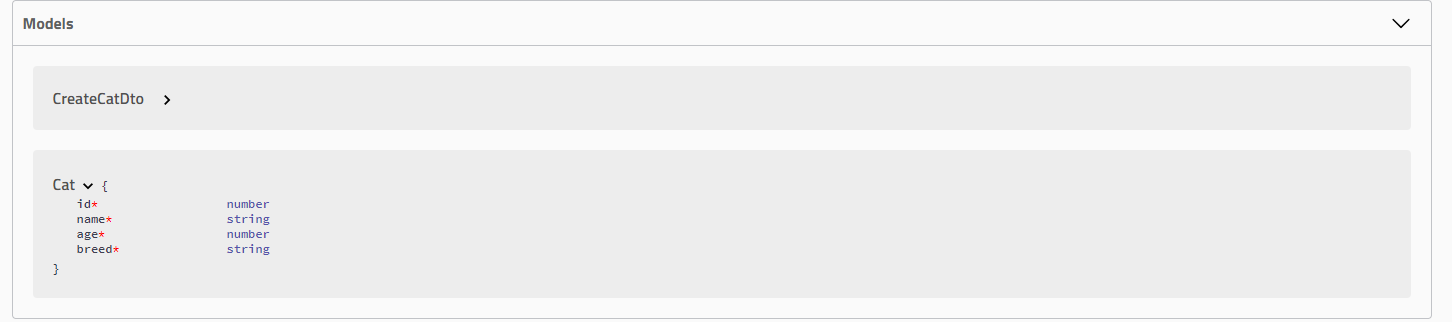
Thay vì định nghĩa response cho từng endpoint hoặc controller riêng lẻ, bạn có thể định nghĩa một response toàn cục (global) cho tất cả endpoint bằng class DocumentBuilder. Cách này hữu ích khi bạn muốn định nghĩa một response chung cho toàn bộ endpoint trong ứng dụng (ví dụ, cho các lỗi như 401 Unauthorized hay 500 Internal Server Error).
const config = new DocumentBuilder()
  .addGlobalResponse({
    status: 500,
    description: 'Internal server error',
  })
  // other configurations
  .build();
Upload file
Bạn có thể bật upload file cho một method cụ thể bằng decorator @ApiBody kết hợp với @ApiConsumes(). Đây là một ví dụ đầy đủ, dùng kỹ thuật Upload file:
@UseInterceptors(FileInterceptor('file'))
@ApiConsumes('multipart/form-data')
@ApiBody({
  description: 'List of cats',
  type: FileUploadDto,
})
uploadFile(@UploadedFile() file: Express.Multer.File) {}
Trong đó FileUploadDto được định nghĩa như sau:
class FileUploadDto {
  @ApiProperty({ type: 'string', format: 'binary' })
  file: any;
}
Để xử lý upload nhiều file, bạn có thể định nghĩa FilesUploadDto như sau:
class FilesUploadDto {
  @ApiProperty({ type: 'array', items: { type: 'string', format: 'binary' } })
  files: any[];
}
Extension
Để thêm một Extension vào một request, dùng decorator @ApiExtension(). Tên extension phải có tiền tố x-.
@ApiExtension('x-foo', { hello: 'world' })
Nâng cao: ApiResponse dạng generic
Với khả năng cung cấp Định nghĩa thô, chúng ta có thể định nghĩa schema Generic cho Swagger UI. Giả sử chúng ta có DTO sau:
export class PaginatedDto<TData> {
  @ApiProperty()
  total: number;

  @ApiProperty()
  limit: number;

  @ApiProperty()
  offset: number;

  results: TData[];
}
Chúng ta bỏ qua việc annotate results vì sẽ cung cấp một định nghĩa thô cho nó sau. Bây giờ, hãy định nghĩa một DTO khác và đặt tên là, chẳng hạn, CatDto, như sau:
export class CatDto {
  @ApiProperty()
  name: string;

  @ApiProperty()
  age: number;

  @ApiProperty()
  breed: string;
}
Với những gì đã có, chúng ta có thể định nghĩa một response PaginatedDto<CatDto>, như sau:
@ApiOkResponse({
  schema: {
    allOf: [
      { $ref: getSchemaPath(PaginatedDto) },
      {
        properties: {
          results: {
            type: 'array',
            items: { $ref: getSchemaPath(CatDto) },
          },
        },
      },
    ],
  },
})
async findAll(): Promise<PaginatedDto<CatDto>> {}
Trong ví dụ này, chúng ta chỉ định rằng response sẽ có allOf PaginatedDto và property results sẽ có type Array<CatDto>.
- Function
getSchemaPath()trả về đường dẫn Schema OpenAPI từ trong file đặc tả OpenAPI cho một model cho trước. allOflà một khái niệm mà OAS 3 cung cấp để xử lý các use-case liên quan đến kế thừa (inheritance).
Cuối cùng, vì PaginatedDto không được tham chiếu trực tiếp bởi bất kỳ controller nào, SwaggerModule sẽ chưa thể tạo được định nghĩa model tương ứng. Trong trường hợp này, chúng ta phải thêm nó như một Model bổ sung. Ví dụ, chúng ta có thể dùng decorator @ApiExtraModels() ở cấp controller, như sau:
@Controller('cats')
@ApiExtraModels(PaginatedDto)
export class CatsController {}
Nếu bạn chạy Swagger ngay bây giờ, file swagger.json được tạo ra cho endpoint cụ thể này sẽ có response được định nghĩa như sau:
"responses": {
  "200": {
    "description": "",
    "content": {
      "application/json": {
        "schema": {
          "allOf": [
            {
              "$ref": "#/components/schemas/PaginatedDto"
            },
            {
              "properties": {
                "results": {
                  "$ref": "#/components/schemas/CatDto"
                }
              }
            }
          ]
        }
      }
    }
  }
}
Để làm cho nó tái sử dụng được, chúng ta có thể tạo một decorator tùy chỉnh cho PaginatedDto, như sau:
export const ApiPaginatedResponse = <TModel extends Type<any>>(
  model: TModel,
) => {
  return applyDecorators(
    ApiExtraModels(PaginatedDto, model),
    ApiOkResponse({
      schema: {
        allOf: [
          { $ref: getSchemaPath(PaginatedDto) },
          {
            properties: {
              results: {
                type: 'array',
                items: { $ref: getSchemaPath(model) },
              },
            },
          },
        ],
      },
    }),
  );
};
Gợi ý Interface Type<any> và function applyDecorators được import từ package @nestjs/common.
Để đảm bảo SwaggerModule sẽ tạo một định nghĩa cho model của chúng ta, chúng ta phải thêm nó như một model bổ sung, giống như đã làm với PaginatedDto ở controller trước đó.
Với những gì đã có, chúng ta có thể dùng decorator tùy chỉnh @ApiPaginatedResponse() trên endpoint của mình:
@ApiPaginatedResponse(CatDto)
async findAll(): Promise<PaginatedDto<CatDto>> {}
Đối với các công cụ sinh code client, cách làm này gây ra sự mơ hồ (ambiguity) trong việc PaginatedResponse<TModel> được sinh ra cho client như thế nào. Đoạn code sau là ví dụ về kết quả của một công cụ sinh code client cho endpoint GET / ở trên.
// Angular
findAll(): Observable<{ total: number, limit: number, offset: number, results: CatDto[] }>
Như bạn thấy, kiểu trả về (Return Type) ở đây bị mơ hồ. Để giải quyết vấn đề này, bạn có thể thêm property title vào schema cho ApiPaginatedResponse:
export const ApiPaginatedResponse = <TModel extends Type<any>>(
  model: TModel,
) => {
  return applyDecorators(
    ApiOkResponse({
      schema: {
        title: `PaginatedResponseOf${model.name}`,
        allOf: [
          // ...
        ],
      },
    }),
  );
};
Giờ đây kết quả của công cụ sinh code client sẽ trở thành:
// Angular
findAll(): Observable<PaginatedResponseOfCatDto>
Ghi chú người dịch Nếu bạn từng viết OpenAPI tay ở PHP/Laravel (ví dụ qua l5-swagger), phần allOf này tương đương với việc bạn merge (gộp) hai schema lại: một schema base (PaginatedDto) và một schema override chỉ định lại field results. Vấn đề “Return Type mơ hồ” ở đây không phải do Nest hay Swagger có lỗi, mà do bản thân OpenAPI 3.0 không có khái niệm generic thật — allOf chỉ là cách xấp xỉ (approximate) generic bằng cách kết hợp schema tĩnh, nên công cụ sinh code client không tự suy ra được kiểu PaginatedDto<CatDto> nếu bạn không đặt title để đánh dấu rõ nó là một biến thể riêng.